The short answer
For staying connected while you drive, the weBoost Drive Reach RV is the strongest in-motion cell booster in 2026. If you mostly boost signal parked at a campground, the weBoost Destination RV's telescoping antenna reaches farther. Power users who want multi-carrier SIM routing should look at the Pepwave MAX Transit; the SureCall Fusion2Go 3.0 is the best value. Remember a booster amplifies an existing signal — it cannot create bars where there are none.
Why we're confident: we separate true cell boosters from WiFi extenders (they solve different problems) and rank by real-world uplink strength for RV use.
Quick picks
- Best overall (in-motion): weBoost Drive Reach RV (470354) — strongest uplink for highway dead zones, works at speed. Premium · ~$625
- Best stationary: weBoost Destination RV (470159) — telescoping pole antenna for parked campground signal. Premium · ~$609–650
- Best for power users: Pepwave MAX Transit (Peplink) — pro-grade dual-modem/SIM router. Premium · ~$700
- Best value booster: SureCall Fusion2Go 3.0 RV — in-motion booster at a friendlier price. Mid · ~$450
- Best budget booster: HiBoost Travel 4G 2.0 RV — 50 dB gain, all carriers. Mid · ~$300–400
- Best WiFi extender: ALFA WiFi CampPro 3 — grabs and rebroadcasts weak campground WiFi (not a cell booster). Budget · ~$130–180
What a booster can and can't do
A cell booster takes the weak signal that already exists outside your rig, amplifies it, and rebroadcasts it inside. That's the whole trick — and it's why the single most important rule is: a booster can only amplify a signal that's already there. If you camp where there is no cell coverage at all, no booster can help and a satellite option such as Starlink Mini (~$199 hardware) is the real fix — but everything below is about boosters and WiFi extenders for places that have a faint signal worth amplifying.
| Your situation | Will a booster help? | Better move |
|---|---|---|
| 1–2 bars, slow data | Yes — this is the sweet spot | Stationary booster + high antenna |
| Signal only outside, none inside | Yes | Booster pulls it indoors |
| Dead zone, no signal at all | No — nothing to amplify | Starlink / satellite, or move |
| Strong signal, just want more speed | Marginal | Better data plan / Wi-Fi |
Compare the picks
| Product | Tier | ~Price | Best for |
|---|---|---|---|
| weBoost Drive Reach RV (470354) | Premium | ~$625 | Strongest in-motion uplink for highway dead zones |
| weBoost Destination RV (470159) | Premium | ~$609–650 | Parked boondocking with a tall pole antenna |
| Pepwave MAX Transit (Peplink) | Premium | ~$700 | Power users wanting dual-SIM carrier failover |
| SureCall Fusion2Go 3.0 RV | Mid | ~$450 | In-motion boosting at a friendlier price |
| HiBoost Travel 4G 2.0 RV | Mid | ~$300–400 | Cheapest true 50 dB booster for weekenders |
| ALFA WiFi CampPro 3 | Budget | ~$130–180 | Rebroadcasting weak campground WiFi (not cell) |
The reviews
weBoost Drive Reach RV (470354)

Premium · ~$625 · in-motion, strongest uplink
weBoost's flagship in-motion booster and the one to beat for working on the road. Its standout is reach to the tower (uplink) — the part that matters most when you are 20 miles from anywhere — so it keeps a usable connection through highway dead zones that defeat lesser kits. The right pick if you stream, take calls, or work while the wheels are turning.
Pros
- Best-in-class uplink to distant towers
- Works at speed on travel days
- Carrier-agnostic, all U.S. networks
Cons
- Premium price
- Mobile gain capped by FCC rules
weBoost Destination RV (470159)
Premium · ~$609–650 · telescoping pole antenna
Built for the parked life. The outside antenna rides up a telescoping pole you raise at camp, and that height is where the real gain lives — often more than any spec on the box. If you boondock or sit at one campground for days, this is the kit that turns one flickering bar into workable data. Set up and take down at each stop is the trade.
Pros
- Tall pole antenna = big stationary gain
- Excellent for long stays / boondocking
- Carrier-agnostic
Cons
- Raise/lower the pole each stop
- Not for use while moving
Pepwave MAX Transit (Peplink)
Premium · ~$700 · pro dual-modem/SIM router
Not a booster but a serious router — and the answer for full-timers who run a business from the rig. Dual modems and multiple SIMs let it bond or fail over between carriers, so when one network drops the other carries you. Pair it with a booster antenna and you have the most resilient mobile-internet setup short of satellite. There is a learning curve.
Pros
- Dual-modem, multi-SIM carrier failover
- Enterprise-grade reliability
- Feeds the whole rig at once
Cons
- Highest price here
- Setup is for tinkerers, not plug-and-play
SureCall Fusion2Go 3.0 RV
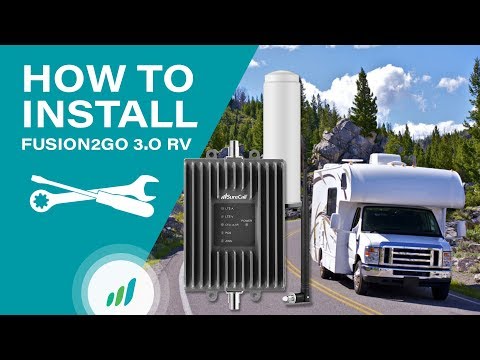
Mid · ~$450 · in-motion value alternative
The strongest challenger to weBoost on the move, usually for less money. It boosts voice and data for everyone in the rig while you drive, with solid real-world reach and a reputation for durable hardware. If the Drive Reach is more booster than your budget wants, this is the smart step down.
Pros
- Strong in-motion performance for the price
- Boosts all passengers' devices
- Well-regarded build quality
Cons
- Uplink reach trails the Drive Reach
- Roof antenna install needed
HiBoost Travel 4G 2.0 RV
Mid · ~$300–400 · 50 dB gain, all carriers
The cheapest credible way into a real cell booster. You get the full 50 dB of gain the FCC allows, support for every U.S. carrier, and an app that helps you aim for the best signal. It will not match the premium kits on raw reach, but for weekenders and part-timers it meaningfully lifts a faint signal for a fraction of the price.
Pros
- Lowest price for a true booster
- Full 50 dB gain, all carriers
- Signal-meter app for aiming
Cons
- Less reach than premium kits
- Best in fringe, not deep dead zones
ALFA WiFi CampPro 3
Budget · ~$130–180 · WiFi extender, not a cell booster
Different tool, same goal — connectivity. This grabs a weak campground or marina WiFi network from across the park and rebroadcasts a strong private network inside your rig. It does nothing for cell signal, so it is not a cell booster, but where free WiFi exists it can save your data plan entirely. Cheap insurance to keep in the bay.
Pros
- Pulls in distant campground WiFi
- Saves cellular data when WiFi is available
- Inexpensive
Cons
- Does not boost cell signal at all
- Only useful where WiFi exists
See it in action
Official demos and hands-on walkthroughs of our picks. Videos play right here via YouTube.
How to choose
1. Stationary vs. mobile
If you mostly work from camp, get a stationary kit and raise the antenna high — that height is the secret. If you need signal on travel days, get a mobile kit. Some RVers run both.
2. Antenna placement beats amplifier specs
Two identical boosters perform wildly differently based on the outside antenna's height and line-of-sight to the tower. Spend your effort here.
3. Be honest about the dead zone
No outside signal means no booster can help. For true off-grid coverage, that's a satellite-internet conversation, not a booster one.
4. Match it to your carrier reality
Boosters amplify all carriers, but they can't fix a carrier that simply has no tower nearby. A second SIM on a different network is often the cheapest "booster" of all.
Frequently asked questions
Will a cell booster work where I have no signal at all?
No. A booster amplifies a weak signal that already exists outside your rig, so it cannot create coverage in a true dead zone. If there is no signal at all, satellite internet such as Starlink is the only real fix.
Do I need a stationary or an in-motion booster?
If you mostly work from camp, a stationary kit with a tall pole antenna delivers the most gain because antenna height matters more than amplifier specs. If you need signal on travel days, an in-motion kit like the Drive Reach works at speed. Some full-timers run both.
Does a cell booster work with all carriers?
Yes, the boosters here are carrier-agnostic and amplify all major U.S. networks at once. However, a booster cannot help a carrier that has no nearby tower, so a second SIM on a different network is sometimes the cheaper fix.
How much faster will my data actually be?
Results vary with how much signal exists to amplify and how well the outside antenna is placed. In the one-to-two-bar range a booster can turn unusable data into workable speeds, but it will not match a strong native connection. Aiming the antenna for line-of-sight to the tower makes the biggest difference.
Are cell boosters hard to install in a motorhome?
In-motion kits require mounting a roof antenna and routing a cable inside, which is a moderate DIY job. Stationary kits use a telescoping pole you raise and lower at each stop, so there is no permanent install but more daily setup. Large Class A coaches have plenty of roof space, which helps with antenna separation.
Related guides
Best RV Internet (Starlink & 5G)
The full internet picture — satellite, 5G, and boosters compared.
Read the guide →Best RV Solar Kits
Keep devices and routers powered off-grid so you can work from the boondocks.
Read the guide →Best RV Portable Power Stations
Silent backup power for laptops, modems, and booster gear away from hookups.
Read the guide →Best RV Backup Cameras
Another connectivity-and-tech upgrade that makes life on the road easier.
Read the guide →