The short answer
For most RVers in 2026, the best internet is Starlink Roam paired with a 5G cellular hotspot. Starlink Roam (with the compact Starlink Mini or the Standard dish) is the only truly portable satellite option and is what keeps you online where there is no cell signal at all; its Roam plans run about $50/mo for 50GB and $165/mo for unlimited, with in-motion and roaming included. Add a 5G hotspot (Verizon, AT&T or T-Mobile) for towns, better battery life, and a backup path. If you mostly have some signal and just need it stronger, a weBoost Drive Reach RV booster or a Peplink router does more than another dish. There is no single box that wins — the right answer is a two-path setup.
Why we're confident: we rank RV internet on real monthly cost and where each option actually works (off-grid vs. town), not on peak lab speeds. Full comparison, real costs, and picks below. (Starlink hardware is sold direct, so those links go to Starlink, not an affiliate.)
Quick picks
- Best overall (off-grid): Starlink Roam + Starlink Mini — portable satellite that works where cell does not. Hardware ~$599 · plans ~$50–165/mo
- Best in-motion: Starlink Flat High Performance — the dish rated to run while you drive. Premium hardware
- Best cellular booster: weBoost Drive Reach RV — turn one weak bar into usable signal. ~$550
- Best pro router: Peplink MAX Transit / BR2 Pro 5G — dual-SIM 5G with carrier bonding. ~$900–1,200
- Best set-and-forget: Winegard ConnecT 2.0 — rooftop 4G LTE + Wi-Fi extender dome. Mid
- Best budget / backup: Netgear Nighthawk M6 5G Hotspot — a simple 5G hotspot on your carrier of choice. Budget–Mid
At a glance
| Option | Where it shines | Rough monthly | Best for |
|---|---|---|---|
| Starlink Roam | True boondocks, no cell signal | ~$50–165 | Off-grid full-timers |
| 5G hotspot / router | Towns and campgrounds with signal | ~$50–100 | Most people, as a second path |
| Cell booster (weBoost) | Fringe areas with one weak bar | No plan (one-time) | Strengthening what you have |
| Campground Wi-Fi extender | Parks with real Wi-Fi | No plan (one-time) | Grabbing weak park Wi-Fi |
*Boosters amplify an existing cell signal — they cannot create bars where there are none. That job belongs to satellite.
The options
Starlink Roam + Starlink Mini

Hardware ~$599 (Mini) · Roam ~$50/mo (50GB) to ~$165/mo (Unlimited)
The reason RVers can now work from anywhere. Starlink Roam is the only truly portable satellite internet, and it delivers real broadband where cell signal simply does not exist. The Starlink Mini is half the size and weight of the standard dish with built-in Wi-Fi, making it the easiest to stow and set up; the Standard dish costs less up front. Roam plans include in-motion use and roaming, and you can pause the service in months you are parked. It is the anchor of any serious off-grid setup — just pair it with cellular for towns, because satellite draws more power and wants a clear view of the sky.
Pros
- Works with no cell signal at all
- Mini is compact, packs easily
- Pausable, in-motion, roaming
Cons
- Higher hardware + monthly cost
- Needs clear sky; higher power draw
Starlink Flat High Performance (In-Motion)
Premium hardware · Roam Unlimited recommended
If you need connectivity while the wheels are turning — for a co-pilot working on the road or for live navigation in dead zones — the flat, permanently mounted High Performance dish is the version rated for in-motion use. It is a bigger investment and a roof install, so it is for full-timers and mobile professionals rather than weekend trips, but nothing else keeps a moving rig online through the backcountry.
Pros
- True in-motion connectivity
- Rugged flat roof mount
- Best antenna performance
Cons
- Most expensive option
- Permanent roof installation
weBoost Drive Reach RV (470354)
~$550 · one-time, no plan · all carriers
When you have one weak bar and need it to be three, a booster does more than a second dish. The weBoost Drive Reach RV is the strongest in-class cellular booster, amplifying signal for every device and every carrier at once, and it works while you drive. It has no monthly fee of its own — it just makes your existing cellular plan usable in fringe areas. Pair it with a hotspot or phone plan; it does not replace them.
Pros
- Strongest RV cell booster
- All carriers, works in motion
- No monthly fee
Cons
- Cannot create signal from nothing
- Needs a roof antenna install
Peplink MAX Transit / BR2 Pro 5G
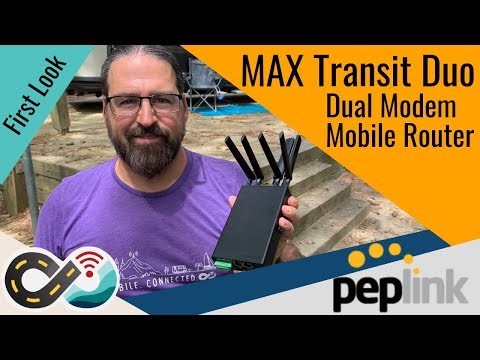
~$900–1,200 · dual-SIM, carrier bonding
The setup serious mobile workers build around. Peplink routers hold multiple SIMs and can even bond Starlink and cellular together, automatically failing over to whichever path is working so a video call never drops. The MAX Transit and BR2 Pro 5G add modern 5G modems and carrier aggregation. It is pro-grade gear at a pro-grade price and takes some setup, but for remote work reliability nothing else manages several connections this gracefully.
Pros
- Dual-SIM, multi-WAN failover
- Can bond Starlink + cellular
- Enterprise reliability
Cons
- Expensive, steeper learning curve
- Overkill for casual use
Winegard ConnecT 2.0
Mid · rooftop dome, 4G LTE + Wi-Fi extender
For RVers who want one tidy rooftop unit rather than a stack of gear, the Winegard ConnecT 2.0 combines a 4G LTE modem and a Wi-Fi range extender into a single dome — grab a distant campground Wi-Fi network or fall back to cellular data, all managed from an app. It is not as fast or flexible as a Peplink build, but it is the cleanest "install it and forget it" option, and Winegard also makes the popular RS-3000 rooftop mount if you want to permanently mount a Starlink dish.
Pros
- One clean rooftop dome
- LTE modem + Wi-Fi extender in one
- App-managed, simple
Cons
- Less powerful than a Peplink setup
- LTE, not 5G
Netgear Nighthawk M6 5G Mobile Hotspot
Budget–Mid · pair with a carrier data plan
The simplest way to add a dedicated internet connection: a 5G hotspot on a Verizon, AT&T or T-Mobile data plan. The Netgear Nighthawk M6 is a strong, well-supported unit that shares fast 5G to your devices, sips far less power than Starlink, and is the natural second path in a two-connection setup — cellular for towns, satellite for the boondocks. It is also the right first purchase for anyone who is not ready to commit to Starlink.
Pros
- Cheap, low power draw
- Fast 5G in covered areas
- Great backup to Starlink
Cons
- Useless with no cell signal
- Needs a carrier data plan
See it in action
Official demos and hands-on walkthroughs of our picks. Videos play right here via YouTube.
How to choose
1. Match the tool to where you actually camp
If you boondock where there is no cell signal, you need satellite — Starlink is the only real portable option. If you mostly stay where there is at least some signal, a 5G hotspot or a booster is cheaper, lighter, and uses far less power. Most full-timers end up running both.
2. Boosters strengthen signal; they do not create it
A cell booster like the weBoost turns a weak, unusable bar into a working one, but it cannot conjure signal from nothing. If your problem is "zero bars," that is a satellite job, not a booster job. Our cell booster guide covers that side in depth.
3. Budget for the monthly, not just the hardware
The sticker price of a dish or router is only part of it. Starlink Roam is roughly $50 to $165 a month depending on data, and a cellular plan adds its own cost. Pausing Starlink in months you are not traveling is an easy way to keep the bill down.
4. Plan your power
Satellite internet is a real, continuous electrical load, so it leans on your battery and solar. A hotspot sips a fraction of the power. If you run Starlink off-grid, size your bank accordingly — see our battery and solar guides.
Frequently asked questions
What is the best internet for an RV in 2026?
For most RVers, the best setup is Starlink Roam paired with a 5G cellular hotspot. Starlink provides broadband where there is no cell signal, and the hotspot covers towns and campgrounds while using much less power. No single device is best for every situation, which is why a two-path setup is the common recommendation.
How much does Starlink for an RV cost?
Starlink Roam hardware runs roughly $349 for the standard dish or about $599 for the compact Starlink Mini, and Roam service is approximately $50 per month for 50GB or about $165 per month for unlimited data, both including in-motion use and roaming. You can pause the service in months you are not traveling.
Do I need Starlink if I already have a cell booster?
Not necessarily. A cell booster like the weBoost strengthens an existing weak signal, so if you usually have at least one bar it may be all you need. Starlink is worth it when you regularly camp in places with no cell coverage at all, where a booster has nothing to amplify.
Can I use RV internet while driving?
Yes, with the right gear. Starlink's flat High Performance dish is rated for in-motion use, and cellular boosters and hotspots work while driving. The compact Starlink Mini is designed mainly for stationary setup, though many RVers use it at stops rather than in motion.
Will an RV internet setup drain my batteries?
Satellite internet is a continuous power draw and can be significant off-grid, so plan your battery bank and solar around it. A cellular hotspot uses far less power. If you rely on Starlink while boondocking, make sure your lithium bank and solar can support the daily load.
Related guides
Best RV Cell Signal Boosters
Turn one weak bar into usable signal — the cellular side in depth.
Read the guide →Best RV Deep-Cycle Batteries
Size the lithium bank that keeps a power-hungry dish running off-grid.
Read the guide →